Mastering TypeScript: Interfaces, Generics, Unions Explained
If JavaScript works, why was TypeScript created?
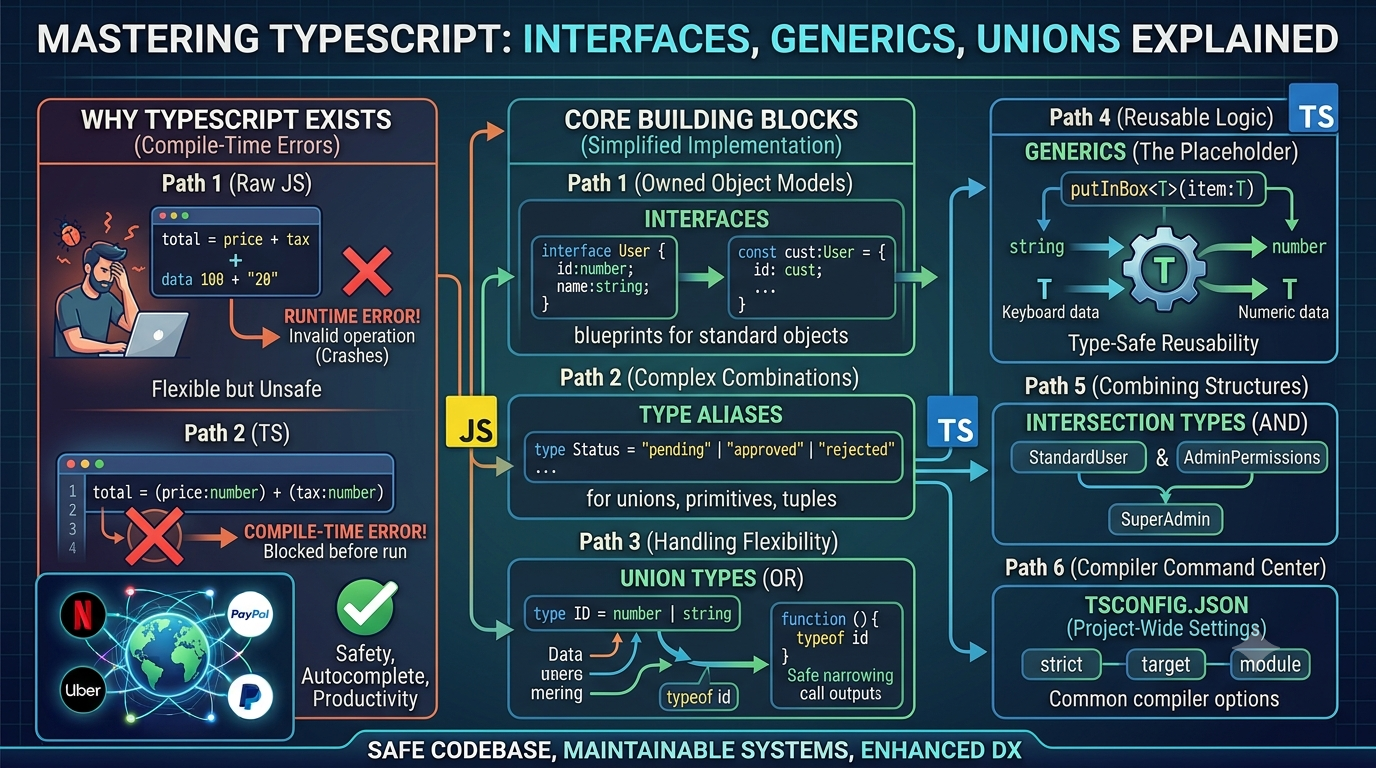
JavaScript is the undisputed language of the web, but it was originally designed to add simple interactivity to web pages—not to build massive, enterprise-scale applications. Because JavaScript is a dynamically typed language, it is incredibly flexible. However, that flexibility comes at a cost: it won't warn you if you pass a string into a function that expects a number until you actually run the code and it crashes.
TypeScript was built to solve this exact problem. It is not a fundamentally new programming language; rather, it is a superset of JavaScript and a powerful developer tool. It adds static typing to JavaScript, catching errors at compile-time (while you are typing in your editor) rather than at runtime (when your user is interacting with your app).
Let's explore the core features of TypeScript that will dramatically improve your code's safety, maintainability, and your overall developer experience.
1. Why TypeScript Exists
In plain JavaScript, if you misspell an object property or pass the wrong argument type, the browser will likely throw a runtime error (Uncaught TypeError: Cannot read property...). In large applications with dozens of developers, tracking down these bugs is time-consuming and expensive.
The Benefits of Static Typing:
Compile-Time Errors: TypeScript acts as a strict proofreader. If you try to call
.toUpperCase()on a number, TypeScript will underline it in red in your editor before you even save the file.Developer Productivity: By understanding the exact "shape" of your data, TypeScript supercharges your editor's autocomplete (IntelliSense). You no longer need to constantly check documentation to remember if a user object has an
idor auserId.Self-Documenting Code: Types serve as living documentation that never goes out of date.
2. Understanding Type Annotations
Type annotations are how you explicitly tell TypeScript what kind of data a variable or function should hold.
JavaScript vs. TypeScript
Here is a simple function in plain JavaScript:
function calculateTotal(price, tax) {
  return price + tax;
}
// What happens if someone does this?
calculateTotal(100, "20"); // Returns "10020" instead of 120
Here is the same function with TypeScript annotations:
function calculateTotal(price: number, tax: number): number {
  return price + tax;
}

// calculateTotal(100, "20"); //  Error: Argument of type 'string' is not assignable to parameter of type 'number'.
Explicit vs. Inferred Types
You don't have to annotate everything. TypeScript is smart enough to infer types in many cases.
// Explicitly stating the type
let username: string = "Alice";

// TypeScript infers this is a string automatically
let userCity = "Seattle";
3. Interfaces vs. Type Aliases
When defining the shape of an object, you have two primary tools: Interfaces and Type Aliases.
Interfaces
Interfaces are used specifically to define the shape of an object. Think of them as blueprints.
interface User {
  id: number;
  name: string;
  email: string;
  isActive: boolean;
}

const customer: User = {
  id: 1,
  name: "John Doe",
  email: "john@example.com",
  isActive: true
};
Type Aliases
Type aliases (type) can also define object shapes, but they are more versatile. They can be used for primitives, unions, and tuples.
type Product = {
  id: string;
  price: number;
};
Which should you use?
| Feature | interface |
type |
|---|---|---|
| Object Models | Yes | Yes |
| Union/Intersection | No | Yes |
| Declaration Merging | Yes (can be reopened and extended) | No (closed once defined) |
Rule of thumb: Use interface for defining standard object shapes (like a User or Order), and use type when you need complex combinations (like unions).
4. Union Types
Sometimes, a value can legitimately be more than one type. Union types allow you to combine multiple possible types using the pipe | symbol.
Real-World Use Case
Imagine a product ID that could be a database integer or a UUID string.
type ProductID = number | string;

function fetchProduct(id: ProductID) {
  // We must handle both possibilities safely (Type Narrowing)
  if (typeof id === "string") {
    console.log(`Fetching string ID: ${id.toUpperCase()}`);
  } else {
    console.log(`Fetching number ID: ${id.toFixed(2)}`);
  }
}
Union types are also excellent for defining strict states, such as type Status = "pending" | "approved" | "rejected";.
5. Intersection Types
While unions say "this OR that," intersection types use the & symbol to say "this AND that." They are perfect for combining multiple type definitions into one reusable structure.
type StandardUser = {
  name: string;
  email: string;
};

type AdminPermissions = {
  canDeleteUsers: boolean;
  canManageRoles: boolean;
};

// Creating a new type by merging the two
type SuperAdmin = StandardUser & AdminPermissions;

const admin: SuperAdmin = {
  name: "Sarah",
  email: "sarah@company.com",
  canDeleteUsers: true,
  canManageRoles: true
};
6. Generic Functions
Generics are often the most intimidating part of TypeScript, but they are incredibly powerful.
Imagine a function that takes an item and puts it in a box. In plain JS, the box accepts anything. In strict TS, you might be tempted to use the any type, but any defeats the purpose of TypeScript because you lose autocomplete.
Generics act as a placeholder for a type. They allow you to build a reusable function that locks in the type at the moment you use it.
// The <T> is a placeholder (Type Variable)
function putInBox<T>(item: T) {
  return { content: item };
}

// When we call it, T becomes 'string'
const stringBox = putInBox<string>("Keyboard");
console.log(stringBox.content.toUpperCase()); // Safe! TS knows it's a string.

// Here, T becomes 'number'
const numberBox = putInBox<number>(42);
// console.log(numberBox.content.toUpperCase()); // Error: numbers don't have toUpperCase.
Generic Constraints
You can also limit what a generic can be using the extends keyword. For example, <T extends id: number { }> ensures that whatever type is passed in, it must have an id property.
7. Understanding tsconfig.json
Because TypeScript is a developer tool, it requires configuration. When you initialize a project, you generate a tsconfig.json file. This is the command center for your compiler.
Key configurations include:
target: Tells the compiler which version of JavaScript to output (e.g.,ES2015,ES6, orESNext).module: Defines the module system (e.g.,CommonJSfor Node.js,ESNextfor modern frontend).strict: When set totrue, this enables a suite of strict type-checking options. (Always leave this on for a safe codebase).outDir: The folder where the compiled JavaScript files will be saved.
8. The TypeScript Compilation Process
Browsers and Node.js cannot run TypeScript directly. They only understand JavaScript.
Therefore, TypeScript must undergo a compilation (or transpilation) process:
Parsing: The TypeScript compiler (
tsc) reads your.tsfiles.Type Checking: It analyzes the code against your interfaces, unions, and generics to ensure there are no logical or structural errors.
Emission: If everything is correct, it strips away all the type annotations, interfaces, and generics, outputting clean, standard
.jsfiles based on yourtsconfig.jsontarget.
This build workflow ensures that by the time your code reaches production, it is standard, highly optimized JavaScript, but fortified by the rigorous checks it passed during development.